Azure AI Search is a managed retrieval service for full-text and vector search. In a retrieval-augmented generation (RAG) system, it supplies candidate passages to the application; it does not guarantee that the final model answer is correct or adequately authorized. The application still needs to select an appropriate retrieval strategy, enforce access, and evaluate results. Azure AI Search overview
Why enterprise search needs hybrid retrieval
Full-text search is useful when a query includes exact terms such as a policy number, product code, or person's name. Vector search compares numeric representations and can retrieve semantically similar content even when the wording differs. Each approach has failure modes: keyword search may miss paraphrases, while vector search may return conceptually related passages that do not contain the exact identifier or answer.
Azure AI Search hybrid search runs full-text and vector queries in one request and merges their ranked lists with Reciprocal Rank Fusion (RRF). This gives the application one result set to evaluate and pass into downstream processing. It does not mean that keyword and vector scores are directly comparable or that every result is relevant. Hybrid search overview
| Retrieval method | Useful for | Example |
|---|---|---|
| Keyword search | Exact identifiers, names, codes, and phrases | Invoice INV-48291 |
| Vector search | Semantic similarity and paraphrased queries | How can I reset multi-factor authentication? |
| Hybrid search | Combining exact matches with semantic retrieval | Find the return policy for damaged electronics |
| Hybrid with semantic ranking | Reranking a candidate set for text relevance | Which onboarding guide explains security clearance? |
How hybrid search works
An index can store searchable text, filterable metadata, and vector fields. The application submits a text query, vector query, or both. When it submits both in one hybrid query, Azure AI Search executes the full-text and vector searches in parallel, then merges results using RRF. Vector search supports approximate HNSW and exhaustive K-nearest-neighbor search; the choice affects recall, latency, and compute characteristics. Hybrid search overview, Vector search overview
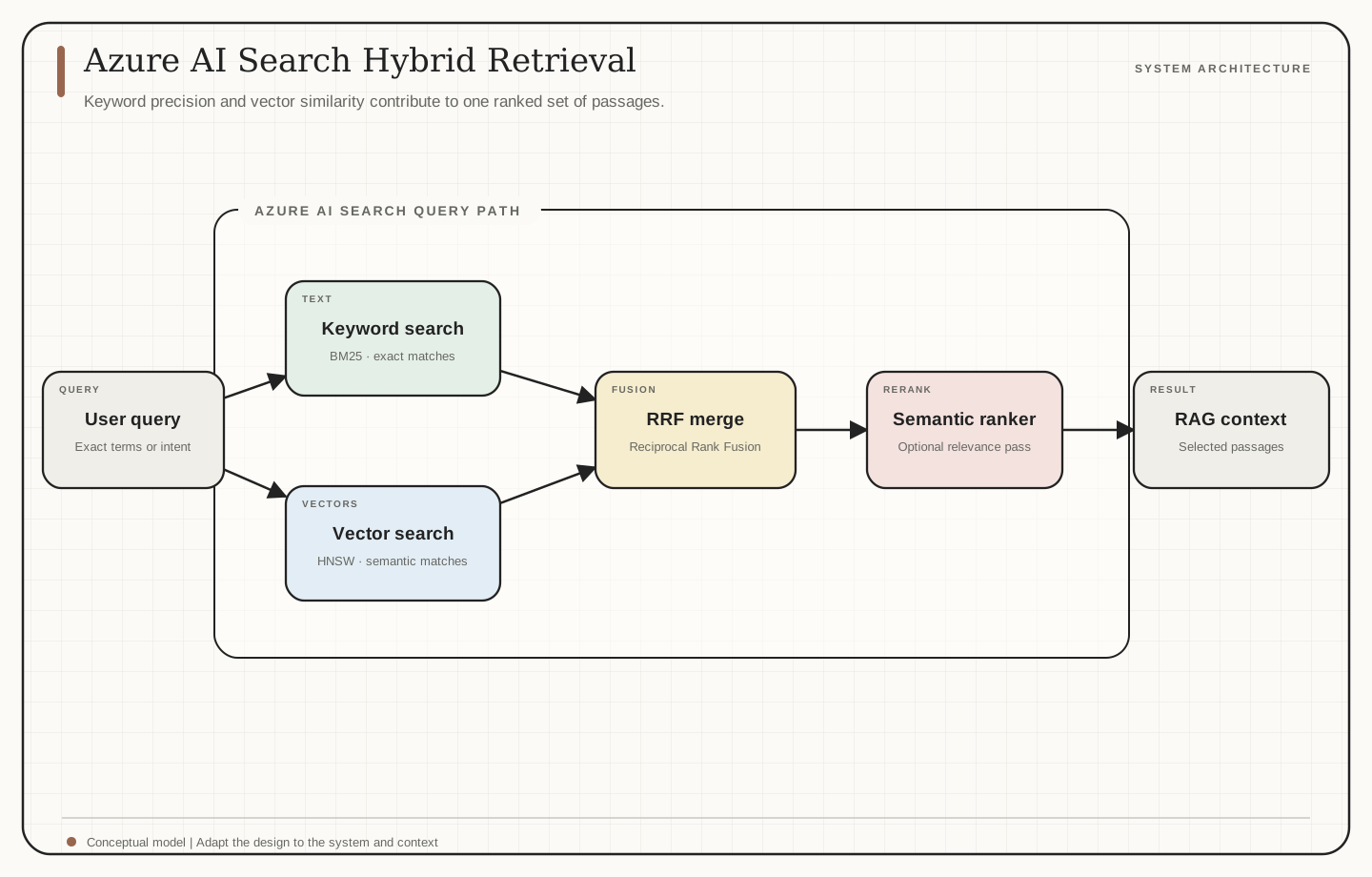
Semantic ranker is an optional second-stage reranker for an initial BM25- or RRF-ranked result set. It can rerank text, vector, and hybrid results when the index and query meet its requirements. Treat it as a separate query stage and measure its relevance, latency, and cost on your own dataset. Semantic ranking overview, Add semantic ranking to queries
A practical RAG architecture
A search-backed RAG pipeline commonly includes:
- Ingestion: Collect documents from approved sources and retain source identifiers.
- Extraction and chunking: Extract usable text and split it into passages while preserving document and section context.
- Enrichment: Generate embeddings and attach metadata such as source, date, tenant, and permissions.
- Indexing: Store searchable text, vector fields, and filterable metadata in an index.
- Retrieval: Run keyword, vector, or hybrid queries with the required filters.
- Reranking: Optionally use semantic ranking to improve the ordering of a candidate set.
- Generation: Pass selected evidence to the model with instructions to cite sources and abstain when evidence is insufficient.
- Evaluation: Measure retrieval quality, groundedness, citation correctness, latency, and cost.
The diagram shows the query path from a user request through keyword and vector search, RRF, optional semantic ranking, and selected RAG context. Indexing and document preparation happen before that query path and are not shown in this specific diagram.
Enterprise security and governance
Azure AI Search provides platform-level security controls for network access, identity, and data protection. Configuration matters: role-based access through Microsoft Entra ID is optional, and key-based authentication is the default. Document-level access requires a deliberate design that carries permissions from the source system into the retrieval path. Do not assume an index automatically enforces each source document's ACL. Data, privacy, and built-in protections, Connect using Azure roles, Document-level access control
For RAG, authorization should be evaluated before unauthorized content reaches the model. Choose an approach that matches the identity provider and source system, then test both allowed and denied users, including group changes and stale permissions. Validate filter behavior and failure handling in the application; a correct model response cannot repair an authorization failure in retrieval.
Engineering considerations
- Chunking: Preserve section boundaries and enough metadata to interpret retrieved passages.
- Metadata: Design filterable fields around real tenant, department, document type, and access requirements.
- Embedding compatibility: Use compatible embedding models and preprocessing for indexed content and queries.
- Evaluation: Measure recall and precision at retrieval separately from answer quality.
- Security: Test permission filters, tenant isolation, and index-level access independently.
- Operations: Tune vector configuration, candidate counts, semantic ranking, capacity, and cost against representative traffic.
Conclusion
Hybrid retrieval can combine exact-term matching with semantic similarity, but the index and query need careful design. Reliable enterprise RAG depends on evaluated retrieval, explicit document permissions, and a downstream generation layer that treats retrieved text as evidence rather than authority.
References
- Microsoft Learn. What is Azure AI Search?
- Microsoft Learn. Hybrid search using vectors and full-text search
- Microsoft Learn. Vector search in Azure AI Search
- Microsoft Learn. Semantic ranking in Azure AI Search
- Microsoft Learn. Add semantic ranking to queries
- Microsoft Learn. Data, privacy, and built-in protections in Azure AI Search
- Microsoft Learn. Connect to Azure AI Search using roles
- Microsoft Learn. Document-level access control in Azure AI Search