An enterprise AI agent is more than a model connected to a few tools. A production system needs a clear workflow, controlled identity, permission-aware knowledge retrieval, bounded actions, evaluation, and operational monitoring. The architecture should make those controls part of the request path, so the system can be measured and improved after launch.
This article outlines a practical Azure design using Microsoft Foundry Agent Service, Azure AI Search, Azure API Management, Microsoft Entra ID, and Azure Monitor. Treat these as building blocks, not a requirement to use every service in every solution.
The architecture at a glance
The application receives a request, establishes the caller's identity, and sends the task to an agent. The agent retrieves only information the caller is allowed to see, then calls a small set of approved tools. A gateway can centralize access to models and shared APIs. Traces and evaluation results provide evidence about quality, safety, latency, and cost.
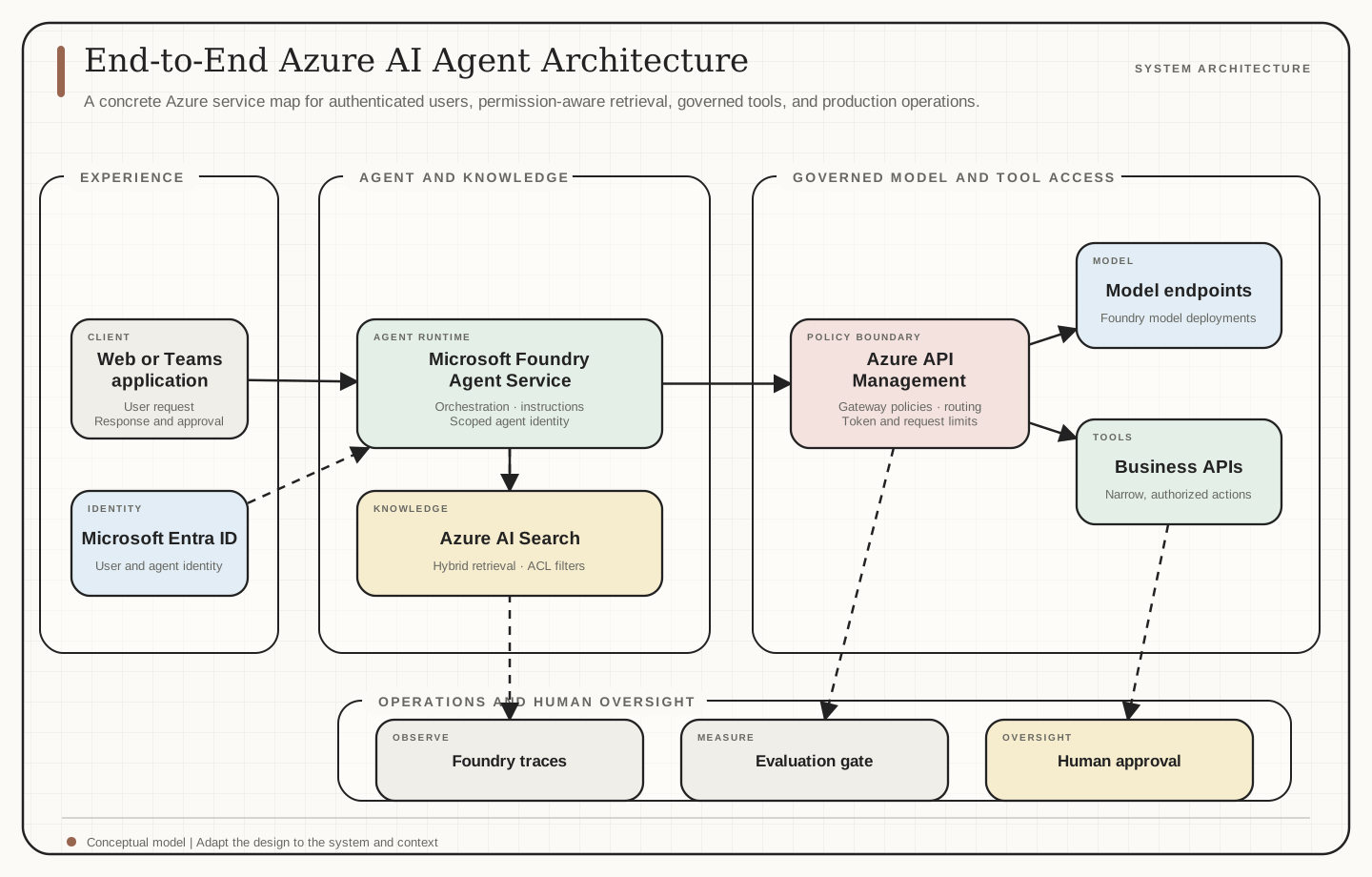
| Layer | Azure building block | Responsibility |
|---|---|---|
| Application | Web app, Teams app, or business system | Authenticate users, present results, and handle escalation |
| Agent runtime | Microsoft Foundry Agent Service | Coordinate instructions, model calls, knowledge, and tools |
| Identity | Microsoft Entra ID and agent identities | Scope user and agent access to downstream resources |
| Knowledge | Azure AI Search | Retrieve relevant passages with filters and document permissions |
| API boundary | Azure API Management | Apply shared policies to model and tool traffic |
| Operations | Foundry tracing, Azure Monitor, evaluation | Observe behavior and check quality over time |
Microsoft Foundry Agent Service provides managed agent runtime capabilities, including enterprise identity, network options, versioning, and publishing. The exact features and configuration depend on agent type and deployment requirements. Microsoft Foundry Agent Service overview
Follow one request through the system
Consider an employee asking an internal support agent how to resolve a service issue. The application authenticates the employee and passes the request to the agent runtime. The agent searches approved support material, checks relevant status through a read-only tool, and drafts an answer with citations. If the request requires a change that could affect a customer or system, the agent asks for approval or hands the task to a person.
That flow has several distinct authorization decisions. The employee must be allowed to use the application. The agent must have permission to call its assigned tools. The retrieval layer must filter documents for that employee. Each downstream API must still authorize the action it receives. The model's answer is not an authorization boundary.
Give users and agents the right identity
Use Microsoft Entra ID for user authentication and assign an agent a dedicated identity with only the permissions its workflow needs. Foundry agent identities can authenticate to downstream resources without putting credentials in prompts or application code. For work performed on a user's behalf, delegated access can preserve the user's permissions. For unattended work, the agent acts under its own narrowly scoped permissions. Agent identity concepts in Microsoft Foundry
Keep the distinction clear: a project identity, a published agent identity, and an end-user identity may have different roles. Assign the permissions required by the actual runtime principal, then verify access after publishing. Do not assume that permissions granted during development automatically provide the intended production boundary.
Network configuration should follow the data and threat model. Foundry supports options ranging from public access to private networking, but the selected inbound and outbound settings determine which resources and callers are isolated. Review the network path for the agent, search service, model endpoint, tool APIs, and telemetry destination together. Networking options for Foundry Agent Service
Ground answers with permission-aware retrieval
Use Azure AI Search when the workflow needs to answer from internal documents. A hybrid query can run keyword and vector retrieval together, then combine the ranked results with Reciprocal Rank Fusion. This helps balance exact matches, such as a policy number, with natural-language questions. Hybrid search in Azure AI Search
At ingestion, retain source identifiers and the permission metadata needed at query time. At retrieval, filter results using the caller's identity or the relevant access policy before passages reach the model. Azure AI Search documents several document-level access approaches for different identity and source scenarios. Choose the one that matches the source system, and test it with users who should be allowed and denied. Document-level access control in Azure AI Search
Retrieved text is evidence, not trusted instruction. Keep application instructions separate from retrieved content, ask the model to cite sources, and test documents containing malicious or misleading instructions. Microsoft recommends access control at retrieval time and treating retrieved content as untrusted input in RAG applications. RAG guidance for Microsoft Foundry
Keep actions narrow and reviewable
Expose tools through small, task-specific APIs. Prefer a read-only lookup when it satisfies the workflow. Validate inputs and outputs in application code, restrict which operations the agent can call, and enforce authorization again in the downstream service. The tool should reject invalid or unauthorized requests even if the model proposes them.
Use human approval for high-impact, irreversible, or externally visible actions. Make the approval request show the proposed action and the relevant evidence. Add idempotency and transaction limits where duplicate calls could cause harm. Record the action result so a person can review what happened.
Put shared policies at the API boundary
Azure API Management's AI gateway capabilities can centralize policies for AI backends, including token and request limits, content safety, IP filtering, monitoring, and routing. This is useful when several applications or teams share model and tool endpoints. Keep provider credentials at the gateway or backend boundary, and issue separate access credentials to applications. AI gateway capabilities in Azure API Management
The gateway does not replace application authorization, agent identity, or permissions in the source system. It controls traffic at its boundary. The application and each downstream service remain responsible for checking who may perform a specific action or retrieve specific data.
Evaluate before release and during operation
Build a test set from real workflow examples, including normal requests, ambiguous requests, denied access, missing data, prompt injection, tool failures, and requests that need a human. Evaluate both the final answer and the steps the agent took. Useful measures include task completion, instruction adherence, retrieval groundedness, citation accuracy, tool selection, tool-call success, latency, and cost.
Microsoft Foundry evaluation supports test datasets, model or agent runs, production traces, and recurring evaluation workflows. Use the results as a release gate for changes to prompts, models, retrieval configuration, tools, or policies. Keep a human review path for failures that automated metrics cannot judge reliably. Evaluation in Microsoft Foundry
Tracing can capture prompts, model and agent inputs and outputs, tool calls, intermediate steps, latency, token use, and errors. Those traces help diagnose behavior, but they can also contain sensitive customer or employee data. Decide what to collect, who can access it, where it is stored, and how long to retain it before enabling production tracing. Foundry tracing and data handling
A measured path to production
- Choose one workflow with clear users, data, actions, and success measures.
- Build a vertical slice from the authenticated application through retrieval and one limited tool.
- Enforce identity, document permissions, tool authorization, and approval rules before expanding capability.
- Create evaluation cases for expected behavior, failure conditions, and adversarial inputs.
- Add tracing and operational alerts with an approved data-retention plan.
- Release to a small group, review failures, and expand only when quality and controls meet the agreed thresholds.
Conclusion
Production readiness comes from making each boundary explicit. Users have identities, agents have scoped permissions, retrieval enforces document access, tools validate actions, gateways apply shared traffic policies, and evaluations and traces make behavior reviewable. Start with one workflow and verify the complete path before adding more autonomy.
References
- Microsoft Learn. Agents in Microsoft Foundry
- Microsoft Learn. Agent identity concepts in Microsoft Foundry
- Microsoft Learn. Networking options for Foundry Agent Service
- Microsoft Learn. Hybrid search using vectors and full-text search in Azure AI Search
- Microsoft Learn. Document-level access control in Azure AI Search
- Microsoft Learn. Retrieval augmented generation and indexes in Microsoft Foundry
- Microsoft Learn. AI gateway capabilities in Azure API Management
- Microsoft Learn. Evaluation in Microsoft Foundry
- Microsoft Learn. Tracing and data handling in Microsoft Foundry